
POS Hardware Dimensions - Model E4/E4Z
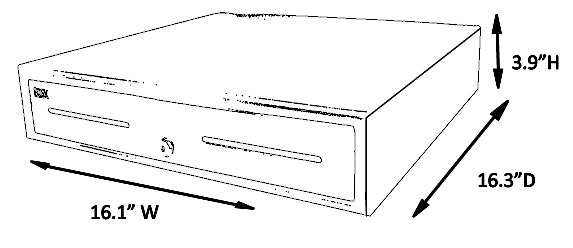
16" Heavy Duty Cash Drawer
| NOTES: | |||||||||||||||||||||||||||||||
| A data cable will run from underneath the cash drawer to the back of the receipt printer. | |||||||||||||||||||||||||||||||
| The port is located in the top left corner of the cash drawer box. |
|||||||||||||||||||||||||||||||
| Cash Drawer Brackets | |||||||||||||||||||||||||||||||
| A bracket set (sold separately) may be used to install and hold cash drawers underneath a counter. | |||||||||||||||||||||||||||||||
| If your design requires a hole for wiring in the counter top, the brackets must be installed with a 1-inch | |||||||||||||||||||||||||||||||
| gap to allow the wiring to run down. You may use wood sized 1-inch thick, approximately 4-inches wide, | |||||||||||||||||||||||||||||||
| and a minimum 16-inches long. | |||||||||||||||||||||||||||||||
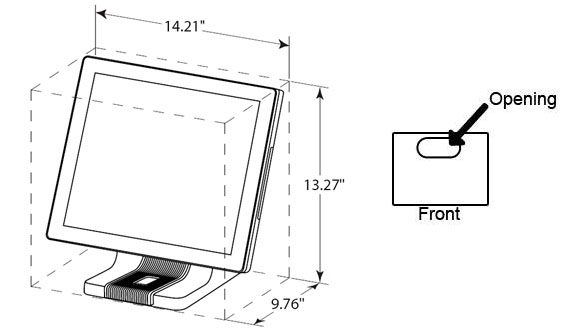
All-In-One POS Unit
| NOTES: | |||||||||||||||||||||||||||||||
| Behind the All-In-One unit's screen are the ports where all there peripherals attach. An opening under the base allows for wiring to be passed through and under the counter. |
|||||||||||||||||||||||||||||||
| In cases where the cash drawer is placed on top of the counter, this all-in-one unit may also be placedon top of the cash drawer. | |||||||||||||||||||||||||||||||
| Cables include: Power Cable, Printer Cable, Scale Cable, Ethernet Cable, and Keyboard (optional). | |||||||||||||||||||||||||||||||
Frozen Yogurt Ounce Scale

| NOTES: | |||||||||||||||||||||||||||||||
| When installing the scale flush to the counter, the scale connection point needs to be taken into | |||||||||||||||||||||||||||||||
| consideration. When building the base, you must leave an opening for the cables to reach the connection | |||||||||||||||||||||||||||||||
| point. The scale has a power connection that requires an outlet, a data cable to connect the scale and the | |||||||||||||||||||||||||||||||
| POS System and a final connection will be for the scale display. | |||||||||||||||||||||||||||||||
Thermal Receipt Printer

| NOTES: | |||||||||||||||||||||||||||||||
|
The printer will require a separate outlet for power. A kick cable will be installed between the printer and cash drawer for opening. Printers are available in different interfaces: Serial (standard), USB (included), Parallel or Ethernet. |
|||||||||||||||||||||||||||||||